UX Anatomy
UX Anatomy: The Toggle
A darkly whimsical UX Anatomy field note on the toggle: why on-off controls need clear labels, obvious state, sensible timing and no ambiguity about what happens when users switch them.
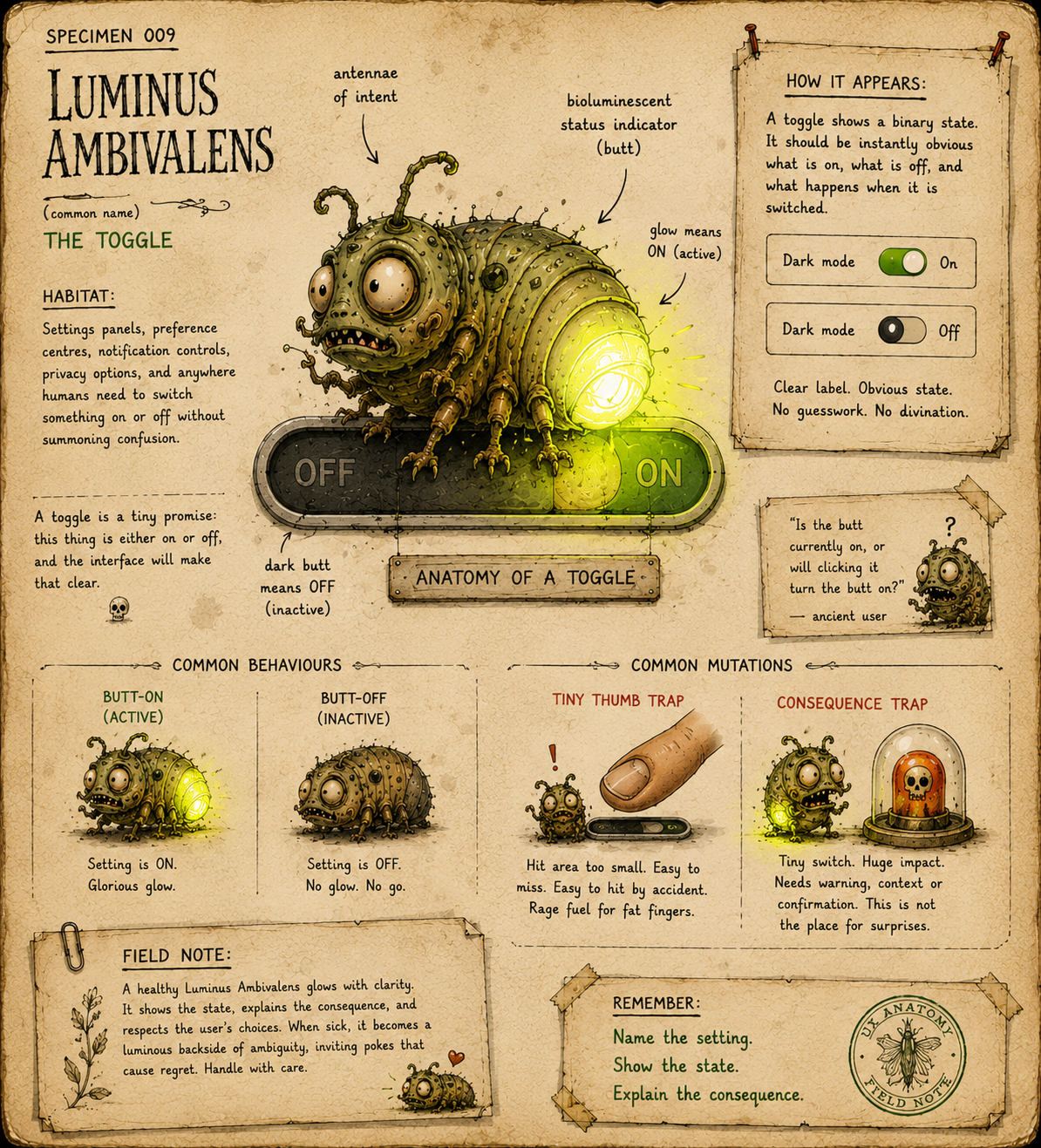
Specimen 009: The Toggle
Creature name: Luminus Ambivalens
Common name: The Toggle
Habitat: Settings panels, preference centres, notification controls, privacy options, app permissions, filters, dashboards, feature flags, checkout options, account settings, and anywhere the interface needs to switch something on or off without starting a small philosophical dispute.
Field Description
Luminus Ambivalens is a small glow-bug creature found in binary interface habitats.
It has two states: glowing and not glowing. On and off. Active and inactive. Butt illuminated, butt extinguished.
In theory, this should be simple.
In practice, the Toggle is one of the most quietly ambiguous creatures in the interface undergrowth. It asks users to understand whether the visible state means "this is currently on" or "click here to turn it on." It may apply changes immediately, or it may require saving. It may control one setting, a whole section, or a hidden swarm of consequences.
A healthy toggle is boringly clear.
An unhealthy toggle is a glowing arsehole of uncertainty.
Anatomical Function
The Toggle exists to let users switch a setting between two opposing states.
Its job is to communicate:
- What setting is being controlled
The user should know exactly what the toggle affects. - What the current state is
The interface should clearly show whether the setting is on or off. - What will happen if the user changes it
The consequence of switching should be understandable. - Whether the change is immediate or pending
A toggle should not leave users wondering whether their action has already taken effect.
Toggles work best for simple, binary choices where both states are meaningful and predictable.
They work badly when the choice is complex, risky, reversible only with pain, or secretly not binary at all.
Healthy Toggle Traits
A healthy Luminus Ambivalens should:
- have a clear visible label
- make the current state obvious
- avoid relying on colour alone
- use clear "on/off" or state text where needed
- apply changes immediately only when that behaviour is expected
- show confirmation or feedback after significant changes
- avoid vague labels like "Enable" without saying what is being enabled
- avoid destructive or high-risk changes without warning
- work properly with keyboard and assistive technology
- have a sufficient hit area on touch devices
- remain visually distinct from buttons, sliders and decorative switches
The best toggles feel like little light switches.
The worst ones feel like poking a beetle and hoping it does not cancel your insurance.
Common Mutations
1. The Ambiguous Glow
This mutation makes it unclear whether the toggle's appearance shows the current state or the action that will happen next.
The user sees a glowing switch and wonders:
- Is this on?
- Will clicking turn it on?
- Is the label describing the current state?
- Is the label describing the future state?
- Why is this tiny pill-shaped insect judging me?
A toggle should not require divination.
If state is important, say it clearly.
Better:
Email notifications: On
Worse:
Email notifications: Enable
2. The Butt-On / Butt-Off Confusion
This mutation appears when the toggle relies too heavily on position, colour or a vague glow.
The bug's backside lights up. Something has happened. Possibly.
But users may not know whether "lit" means active, selected, available, highlighted, recommended, or merely suffering from UI bioluminescence.
Use clear visual state, label text, and accessible state information. Colour and glow can support meaning. They should not be the whole meaning.
3. The Save-or-Switch Mystery
This mutation appears when a toggle looks immediate, but the change is not actually applied until the user presses Save.
Or worse: some toggles apply instantly, while others on the same screen require saving.
This creates a tiny trust leak.
Toggles usually imply direct action. If the user flips one, they expect the change to happen. If the change is pending, make that explicit.
Good patterns include:
- "Changes saved"
- "You have unsaved changes"
- a clearly disabled/enabled Save button
- grouped settings that behave consistently
Do not make the user wonder whether the glow-bug has actually done its job or is just sitting there with a luminous bottom.
4. The Consequence Trap
This mutation uses a tiny toggle for a decision with larger consequences.
Examples include:
- disabling account security
- changing privacy visibility
- opting into recurring payments
- deleting data sync
- allowing public sharing
- turning off important alerts
A toggle is fast. That does not mean every decision should be fast.
For risky changes, add explanation, confirmation, or a safer pattern.
Tiny switch. Big consequence. Bad goblin.
5. The Negative Label Knot
This mutation wraps the toggle in confusing negative phrasing.
Examples:
- "Don't send me updates"
- "Disable notifications"
- "Opt out of not receiving reminders"
- "Prevent account from not being visible"
Now the user has to mentally invert the label, the state and the action.
This is how settings pages become haunted.
Prefer positive, plain labels:
Email notifications
Then show the state:
On / Off
6. The Fake Binary
This mutation pretends a complex choice has only two states.
The toggle says on/off, but the real question involves:
- frequency
- scope
- permission level
- audience
- timing
- partial states
- exceptions
- inherited settings
If users need to choose between multiple meaningful options, use radio buttons, segmented controls, checkboxes, dropdowns or a dedicated settings pattern instead.
Not every creature with two cheeks is a toggle.
7. The Tiny Thumb Trap
This mutation creates a switch so small or tightly placed that users struggle to interact with it, especially on mobile.
Symptoms include:
- tiny hit areas
- switches too close together
- unclear focus states
- accidental taps
- labels not clickable
- poor spacing in dense settings lists
A toggle should be easy to turn on or off without requiring the fingertip precision of a watchmaker defusing a cursed pea.
Behavioural Symptoms
You may have an unhealthy Luminus Ambivalens infestation if users:
- ask whether a setting is currently on or off
- toggle the same control repeatedly to check what happened
- change settings accidentally
- fail to save changes they thought were immediate
- expect instant changes but nothing happens
- turn off important features without understanding the consequence
- struggle to use settings on mobile
- miss disabled or inactive states
- misunderstand opt-in or opt-out wording
- avoid settings pages because everything feels like a trap
A bad toggle does not just confuse people. It makes them distrust the settings.
UX Diagnosis
Toggles look simple because they are visually small.
But they carry a lot of meaning.
A toggle communicates state, action, timing and consequence in one tiny control. If any of those are unclear, users hesitate. If several are unclear, they stop trusting the interface entirely.
The most common toggle failure is assuming that visual convention will do all the work.
But conventions vary. Some users read the label first. Some read the position. Some rely on colour. Some use screen readers. Some are colour blind. Some are tired. Some are in a settings page at 11:47pm trying to stop an app from sending chirpy little nonsense into their life.
The Toggle needs to be unambiguous because it often controls user autonomy.
Notifications. Privacy. Visibility. Tracking. Permissions. Billing. Security.
The glow-bug may be tiny, but it often sits on top of a serious decision.
Accessibility Notes
Toggles need to expose their role, label and state clearly.
Watch for:
- custom switches without correct semantic roles
- screen readers not announcing whether the toggle is on or off
- missing accessible labels
- labels that are visually nearby but not programmatically associated
- reliance on colour alone
- poor contrast between on, off and disabled states
- unclear focus indicators
- tiny hit areas
- toggles that cannot be operated by keyboard
- state changes that occur without feedback
- instructions hidden in tooltips or placeholder-style microcopy
Where possible, use native controls or ensure custom controls behave like proper switches.
A toggle that only works visually is not a toggle. It is a decorative beetle with governance issues.
Practical Treatment
- Label the setting, not the action
Use the label to name what is controlled.Better:
Email notifications
Not:
Enable
Then show the state clearly:
On / Off
- Make the current state obvious
Position, colour, text and accessible state should all agree.A user should not have to infer the toggle's meaning from vibes, glow intensity or the direction of a tiny pill goblin.
- Be consistent about timing
If toggles apply immediately, make that true across the screen.If changes require saving, make that obvious and consistent.
Do not mix instant and save-required toggles unless you enjoy breeding distrust.
- Explain risky consequences
For high-impact settings, add supporting text.A user with a password manager is trying to do security properly. Do not tackle them at the door.
Example:
Public profile
When this is on, anyone with the link can view your profile.If turning something off has consequences, say so before the user does it.
- Avoid double negatives
Use clear, positive labels wherever possible.Better:
Marketing emails: Off
Worse:
Do not send me promotional updates
The user came to change a setting, not solve a cursed grammar puzzle.
- Use the right control
Use a toggle for immediate binary settings.Use other patterns when the user needs to choose:
- one option from many
- several independent options
- a quantity
- a level
- a range
- a temporary filter
- a decision requiring confirmation
Do not make the glow-bug do snake work. That is how we get sliders.
- Make it easy to hit
Give toggles generous spacing, clickable labels and clear focus states.The user should not need to surgically prod the bug's luminous backside to change a setting.
Better Patterns
Use:
Email notifications
On
Instead of:
Enable
Use:
Public profile: Off
When on, anyone with the link can view your profile.
Instead of:
Visibility
Use:
Save changes
when the change is pending
Use:
Changes saved
when the change is immediate and completed.
Use:
Marketing emails: Off
Instead of:
Do not send me marketing emails: On
Use:
Two-step verification: On
with clear confirmiation if turning it off
Instead of:
Security: Disable
The pattern is simple: name the setting, show the state, explain the consequence.
Field Note
A good toggle is a tiny promise: this thing is either on or off, and the interface will make that clear.
When Luminus Ambivalens is healthy, its glow is calm, labelled and trustworthy.
When it is sick, it becomes a luminous backside of ambiguity, inviting users to poke first and discover consequences later.
A toggle should not make people ask, “Is the butt currently on, or will clicking it turn the butt on?”
A toggle should not make people ask, “Is the butt currently on, or will clicking it turn the butt on?”
That way lies madness.