UX Anatomy
UX Anatomy: The Error Message
A darkly whimsical UX Anatomy field note on the error message: why validation should help users recover, not scold them, vanish on them, or snap before they have finished typing.
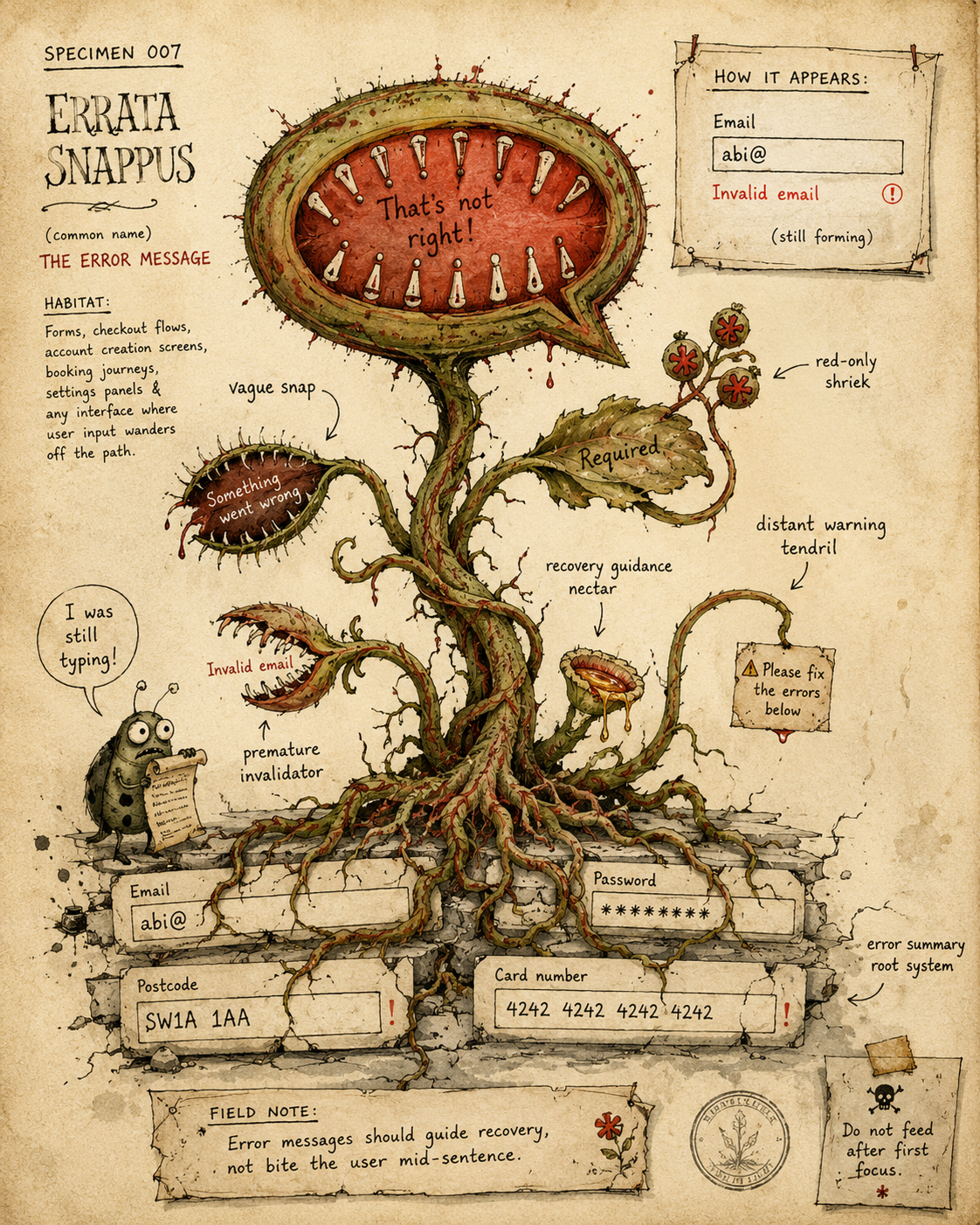
Specimen 007: The Error Message
Creature name: Errata Snappus
Common name: The Error Message
Habitat: Forms, checkouts, account creation flows, payment screens, search filters, booking journeys, password fields, date fields, and anywhere a user has the audacity to type something the system was not emotionally prepared to receive.
Field Description
Errata Snappus is a carnivorous little specimen that blooms wherever an interface detects trouble.
In healthy environments, it is extremely useful. It appears at the right moment, points to the problem, explains what happened, and helps the user recover without panic, shame, or unnecessary admin.
In unhealthy environments, it becomes aggressive.
It snaps before the user has finished typing. It shrieks in red. It says “invalid input” like that means anything. It lurks at the top of the page while the actual broken field sits three scrolls below, quietly ruining everyone’s afternoon.
An error message is not a punishment.
It is a recovery mechanism with teeth.
Anatomical Function
The function of an error message is to help the user move from failure to success.
A good error message answers four questions:
- What happened?
Tell the user what the system could not accept. - Where did it happen?
Attach the message clearly to the field, choice, or action that needs attention. - Why does it matter?
Explain the constraint if the user needs to understand it. - How can the user fix it?
Give a specific next step.
The best error messages do not merely announce that something is wrong. They make recovery feel obvious.
The worst ones behave like a haunted schoolmaster with a red pen and unresolved authority issues.
Healthy Error Message Traits
A healthy Errata Snappus is specific, calm, visible, and useful.
It:
- appears close to the relevant field or action
- uses plain language
- explains the problem without blaming the user
- tells the user how to fix it
- preserves the user’s input
- appears at a fair point in the interaction
- uses more than colour alone
- is announced properly to assistive technology
- supports keyboard and screen reader users
- lets the user recover without starting again
Healthy error messages sound like:
Enter an email address in the format [email protected].
Not:
Invalid.
Healthy error messages say:
Your password needs at least 8 characters, including one number.
Not:
Password does not meet requirements.
Healthy error messages say:
Choose a return date after your departure date.
Not:
Date error.
The creature still has teeth. It just uses them for pointing, not mauling.
Common Mutations
1. The Vague Snap
This mutation says things like:
- “Invalid input”
- “Something went wrong”
- "Error”
- “Please check your details”
- “Unable to continue”
The Vague Snap knows something has failed, but refuses to participate further.
It is especially common in forms where multiple things could be wrong, but the interface provides one useless message and leaves the user to conduct a small criminal investigation.
A vague error is not guidance. It is a shrug in warning colours.
2. The Blame Bloom
The Blame Bloom scolds the user for failing to satisfy requirements they may not have been shown.
It says:
- “You entered this incorrectly”
- “You failed to complete this field”
- “Incorrect format”
- “Invalid response”
This mutation turns the interface into a disciplinary hearing.
The better pattern is to describe the requirement, not accuse the user.
Better pattern:
We need a postcode in this format: SW1A 1AA.
Not:
You entered an invalid postcode.
3. The Premature Invalidator
This twitchy little beast snaps before the user has had a fair chance to succeed.
It appears when:
- validation fires the moment a field receives focus
- an empty field screams “Required” because the user clicked into it by accident
- an email field says “Invalid email” while the user has only typed abi@
- a date field complains before the full date can physically exist
- a password field lights up red before the user has finished typing
- live validation creates a rolling horror show of temporary failure
It is not helpful to shout “invalid email” at abi@. That is not an error. That is a sentence still putting its shoes on.
Validation should usually wait until the user has meaningfully interacted, left the field, submitted the form, or paused long enough for live feedback to be useful rather than irritating.
4. The Distant Warning
This mutation places the error message far away from the thing it describes.
It may appear:
- at the top of the page only
- under the wrong field
- in a toast that vanishes
- in a summary with no links
- below the fold
- after a long form section the user has already moved past
The user knows something is wrong. They just have to go on an archaeological dig to find it.
Error summaries can be useful, especially on long forms, but they should link to the relevant fields and work alongside inline messages.
5. The Red-Only Shriek
This mutation relies on colour alone.
The border turns red. The text turns red. The interface silently assumes everyone can see, interpret and distinguish the red scream.
Colour is useful. Colour alone is not enough.
A healthy error state should include visible text, clear field association, programmatic cues where needed, and styling that does not rely solely on colour perception.
6. The Vanishing Bite
This mutation appears briefly, then disappears before the user can understand or act on it.
Common habitats include:
- toast notifications
- temporary banners
- disappearing inline messages
- errors that vanish when the field refocuses
- mobile screens where the keyboard covers the message
If the user needs the message to fix the problem, the message must stay available while they are fixing it.
Do not make people memorise the bite.
7. The Password Ambush
This mutation hides the rules until after failure.
The user creates a password. The system rejects it. Only then does the creature reveal its sacred requirements:
- 12 characters
- one capital letter
- one number
- one symbol
- no spaces
- no repeated characters
- no joy
- no peace
- no mother’s maiden name but somehow also don’t use anything memorable
Password rules should be visible before and during entry, not unveiled after the user has already been sacrificed.
Behavioural Symptoms
You may have an unhealthy Errata Snappus infestation if users:
- abandon forms after validation errors
- repeatedly submit the same failed form
- correct the wrong field
- scroll up and down looking for the problem
- delete valid information in panic
- get stuck on password creation
- trigger errors before they understand the input format
- miss errors that only appear in colour
- complain that the form is “broken”
- blame themselves when the interface has failed to explain itself
A bad error message turns a small mismatch into a confidence problem.
UX Diagnosis
Error messages sit at the point where user expectation meets system constraint.
That makes them unusually important.
Most users do not mind correcting a mistake if the interface clearly explains what happened. They do mind being trapped in a loop of vague failure, premature warnings and red visual shouting.
The real UX problem is often not that an error exists. Errors are normal. People mistype. Systems have rules. Data has formats. Payment cards expire. Passwords must not be “password123”, even though spiritually we understand.
The problem is when the interface treats recovery as an afterthought.
A useful error message protects momentum. A bad one breaks it.
The best specimens feel like a handrail. The worst ones feel like a Venus flytrap with a clipboard.
Accessibility Notes
Error messages need to be perceivable, understandable and connected to the relevant control.
Watch for:
- error states indicated by colour alone
- low contrast red or grey text
- messages that are not programmatically associated with fields
- screen reader users not being notified when errors appear
- error summaries that do not link to affected fields
- focus not moving sensibly after failed submission
- keyboard users being dropped into confusion
- tooltips or hover-only explanations containing essential recovery instructions
- messages disappearing before assistive technology can announce them
- validation triggered too aggressively while the user is still typing
For forms, error handling should usually include clear inline messages, a useful summary for multiple errors, and focus management that helps users find and fix problems without losing their place.
An error that cannot be found is not an error message. It is a haunting.
Practical Treatment
To treat a sickly Errata Snappus, start by improving timing, placement and specificity.
- Put the message where the problem is
Place inline errors next to the relevant field or control. For long forms, add an error summary at the top after submission, with links to each affected field. - Say what went wrong
Be specific.Instead of:
Invalid date.
Try:
Enter a date in the format DD/MM/YYYY.
Instead of:
This field is required.
Try:
Enter your postcode so we can check delivery options.
- Say how to fix it
A useful error gives instruction, not just diagnosis.Better:
Choose an end date after the start date.
Worse:
Date range invalid.
- Avoid premature snapping
Do not show errors just because the user focused a field.For most fields, validate after blur, after submit, or after a meaningful pause. For live validation, distinguish helpful guidance from aggressive complaint.
- Preserve the user’s work
Never wipe the whole form after one failed submission unless you want users to imagine setting fire to your product roadmap. - Make errors visible beyond colour
Use text, icons, structure, and accessible field association. Red can support the message. It should not be the only message. - Keep the message available
If the user needs the error to fix the field, do not hide it while they are fixing the field.This is especially important on mobile, where keyboards, scrolling and small screens already make recovery harder.
Better Patterns
Use:
Enter your email address in the format [email protected].
Instead of:
Invalid email.
Use:
Your password needs at least 12 characters.
Instead of:
Weak password.
Use:
Enter a date after 24 May 2026.
Instead of:
Invalid date.
Use:
Select at least one delivery option before continuing.
Instead of:
Required.
Use:
We could not process your payment. Check your card details or try another payment method.
Instead of:
Payment failed.
Use:
We could not save your changes because the connection dropped. Your edits are still here. Try saving again.
Instead of:
Something went wrong.
The pattern is simple: explain the problem, preserve dignity, provide the next step.
Field Note
A good error message does not merely announce failure.
It keeps the user oriented. It explains the rule. It points to the problem. It gives them a way back.
A bad error message turns a fixable moment into a small emotional incident.
Errata Snappus may have teeth, but in healthy specimens, it uses them to hold the handrail steady.